PAUSE
Confirm that you already consider this one request clearly outside what was agreed. If you’re uncertain or want the agreement interpreted, the workflow stops.
For independent web and creative freelancers handling fixed-fee projects
Use a lightweight guided workflow to choose how you’ll handle one extra request, state the impacts you decide, prepare a case-specific response, and ask for confirmation before starting the extra work when applicable.
Use it only when you already consider the request clearly outside what you agreed. If you’re unsure or the case is ambiguous, stop—this workflow doesn’t determine scope status for you.
$19 USD · One-time payment
Get the Workflow — $19 Standalone digital workflow. One request per run. Continue to checkout.An extra revision, deliverable, or request arrives during delivery. You already consider it outside the work you agreed to provide. Before doing the extra, you still need to decide what happens next: include it once as a courtesy, swap it for current work, handle it as a paid add-on, move it to later, or decline it.
That choice can get compressed into an email written on the fly—treatment, impacts, next step, and confirmation all handled at once.
This workflow separates those decisions into a short, clear sequence. It doesn’t make the decision for you. It gives your decision a practical process so you can keep the next communication clear, structured, and professional.
An email template starts with wording. This workflow starts one step earlier:
Treatment → Impacts → Response → Confirmation
First, choose the operational treatment. Then state the work, price, timing, other effect, and next step that apply and that you have decided. Only then does the workflow assemble one editable response around the facts you entered.
The result is less improvisation, a clearer next step, and one compact record of the treatment, impacts, response, and current confirmation state for that request.
This is not a generic script pack. The response is one output of the process—not the whole product.
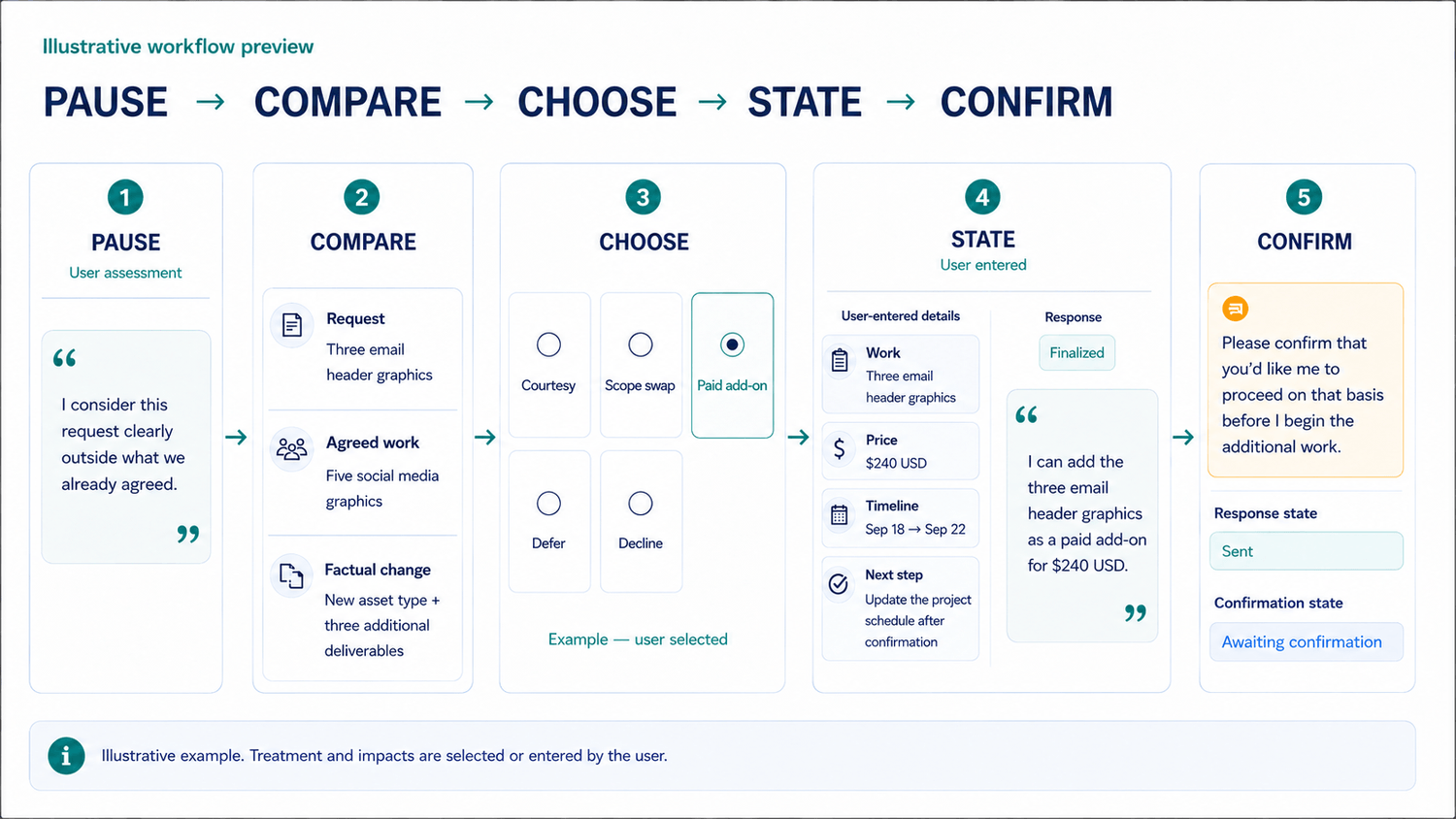
Confirm that you already consider this one request clearly outside what was agreed. If you’re uncertain or want the agreement interpreted, the workflow stops.
Enter the client’s request, the relevant work already agreed, and the factual change—in your own words. The workflow helps you state the comparison; it does not make the scope call.
Select exactly one treatment: explicit courtesy, scope swap, paid add-on, defer, or decline. No option is recommended, ranked, or preselected.
Enter only the work, price, timing, other operational effect, and next step that apply and that you have decided. The workflow does not calculate a price or set a timeline for you.
Review and finalize the case-specific response, send it through your normal client channel, and record the reply state manually. For treatments that proceed with extra work, the response asks for explicit confirmation before you begin. For a decline, confirmation is not required.
PAUSE → COMPARE → CHOOSE → STATE → CONFIRM is a descriptive process—not a legal framework, contract analysis, or guarantee of any client outcome.
Confirm that you already consider the request clearly outside what was agreed. Uncertainty ends the run before case details are collected.
State the request, the relevant agreed work, and what the request would add, replace, or change. The workflow uses the facts you supply.
Choose one of five paths without a default, ranking, or recommendation.
Enter only the work, price, timing, other operational effect, and next step that apply to your chosen path. Any price or timing comes from you.
The builder assembles one editable draft from your request, comparison, treatment, impacts, and next step. You review every line before finalizing it.
Mark the response as finalized and sent, then record the state as awaiting confirmation, confirmed, or not confirmed. The workflow does not read or interpret the client’s reply.
Keep one compact record of the request, selected treatment, impacts, final response, response state, and confirmation state.
The workflow gives each option equal weight. It does not decide which treatment is right for you.
State the specific extra you’ll include once as a courtesy, with no additional charge, plus any timing effect you have decided.
State exactly what will be added and what current work will be removed, reduced, or replaced. The workflow does not decide whether the two are equivalent.
Enter the exact added work, amount, currency, timing effect, and next step you have decided. The workflow does not recommend a rate.
State that the request will not be added now and enter the later date, milestone, or phase you have chosen.
State the request you will not add to the current project and what will continue or happen next. This path does not create a confirmation requirement for extra work.
Each run handles one request and one treatment only.
If you’re not already sure the request is outside what you agreed, stop—this workflow doesn’t determine that for you.
It structures one decision and one response for one request. Your scope assessment, treatment, impacts, wording review, and confirmation record remain your decisions.
Keep using it. This workflow neither replaces nor interprets your contract. It starts after you have made the scope determination and helps structure the next operational decision.
Keep using your operational software. This workflow does not replace it. It structures the decision before you record or carry out the action elsewhere.
That’s useful—but the primary value here is not copywriting. The workflow helps you settle the treatment, impacts, next step, and confirmation requirement first, then assembles one editable response from your inputs.
Stop. This workflow is not for uncertain or ambiguous cases. Clarify the request’s status separately before using it; the workflow will not decide or validate that status for you.
One focused digital workflow
Get the standalone guided workflow for one request at a time:
$19 USD
One-time payment
No subscription, coaching, community, bonus stack, or additional offer.
Get the Workflow — $19 Digital product. One request per run. Continue to checkout.Buy it for a request you already consider clearly outside what you agreed—not to determine whether a request is outside scope.
Pause before starting the extra. Choose the treatment, state the impacts you have decided, prepare the response, and ask for confirmation when applicable.
If the request’s status is uncertain or ambiguous, this workflow is not the right tool for that case.
Get the Workflow — $19 $19 USD. One-time payment. Continue to checkout.